
Add files, batches or folders
Pick one Publisher document, several files at once, paste paths, or add a whole folder.
Turn Microsoft Publisher .pub files into PDFs on Windows — locally, in batches, and completely free. Use Publisher for the closest result when it's installed, or the built-in engine when it isn't.
Independently developed and donation-supported. Buy the developer a coffee ☕
Microsoft recommends converting existing Publisher files to another format so they remain accessible after Publisher's retirement. Read Microsoft's guidance ↗
Why Publisher2PDF exists
Microsoft Publisher reached end of life in October 2026. Microsoft 365 subscribers no longer have Publisher available, while perpetual editions can continue to run but are no longer supported.
That leaves years of newsletters, church bulletins, flyers, brochures, school documents, community programmes and business material stored in .pub files that are harder to open and share.
Microsoft recommends converting existing Publisher files to another format. Publisher2PDF is a small, independent Windows tool built specifically to make the PDF part of that job quick — especially when there are many files to deal with.
Many homes, offices, schools and organisations built up years of Publisher documents.
Microsoft 365 access ends and perpetual Publisher 2021 reaches end of support.
Convert, review and keep a format that is much easier to open, archive and share.
Simple on purpose
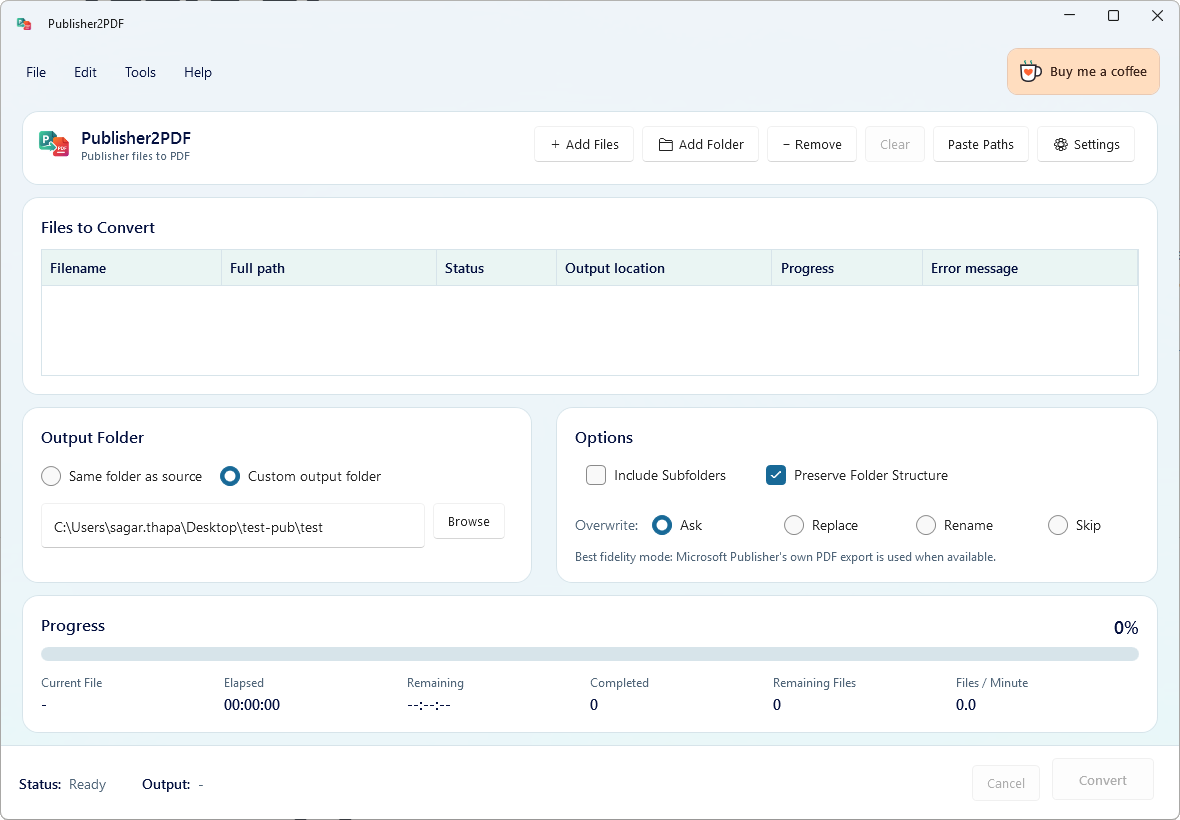
Publisher2PDF is built around the repetitive job: add files, choose where the PDFs should go, then let the app work through the queue.
Pick one Publisher document, several files at once, paste paths, or add a whole folder.
Keep PDFs beside the originals or choose another folder. Decide what happens when a file already exists.
Process the queue locally. Important PDFs should be checked after conversion, especially complex layouts.
One queue. Two engines. PDFs out.
Add individual Publisher files or an entire folder. Publisher2PDF works through the queue locally, uses the best available conversion path, and writes PDFs to the output location you choose.
Two conversion paths
Auto mode chooses the best available path. The important difference is fidelity: Publisher's own PDF export is the reference point; the built-in engine is the practical fallback.
Publisher2PDF checks what is available on the PC and selects the best conversion engine automatically. For most users, this is the setting to leave on.
If Microsoft Publisher is installed, Publisher2PDF uses Publisher's own local PDF export. This is generally the best choice for complex Publisher layouts.
A bundled LibreOffice-based document engine can import Publisher files and create PDFs even when Publisher is not installed. LibreOffice does not need to be installed separately.
The built-in importer can render some documents differently. Fonts that are missing from the PC, specialised text boxes, master-page elements, uncommon graphics and other Publisher-specific layout details can shift. For important documents, compare the PDF with the original whenever possible.
More about conversion fidelitySet the right expectation
With Microsoft Publisher available, Publisher2PDF can use Publisher's own export and generally delivers the closest representation of the original document.
Without Publisher, the built-in engine relies on third-party Publisher-format import support. It is extremely useful for access and bulk conversion, but some complex layouts may render differently.
For anything important: open the generated PDF and review the pages before archiving, printing or distributing it.
Local by design
Publisher2PDF performs conversion locally on your Windows PC. Your Publisher documents and generated PDFs are not uploaded to Publisher2PDF servers.
The website does not need your document contents, filenames, file paths or converted PDFs. Optional donations are handled on Ko-fi, outside the conversion process. Read the full privacy notice.
Your .pub files are read from your PC and the PDFs are written back to the output location you choose.
There is no sign-in, cloud workspace or account requirement before you can convert.
Large or private archives do not need to be sent over the internet just to become PDFs.
Free really means free
Publisher2PDF 1.6.0 is freeware. The converter works the same whether you donate or not — there is no licence key, subscription, evaluation timer or paid conversion tier.
What’s next
Publisher2PDF 1.6.0 is focused on Windows 10/11. A macOS version is in development, with the same goal: make old Publisher files easier to preserve without turning conversion into a subscription service.
Independent software
Publisher2PDF is developed independently and all features are available for free. If it rescued an old document, cleared a folder you had been putting off, or simply saved you time, a coffee helps fund compatibility work, future Windows releases and the macOS version now in development.
Questions before you install?
Publisher2PDF is simple to use, but the retirement of Publisher makes a few details worth understanding.
No. If Publisher is installed, Publisher2PDF can use it for the closest available fidelity. If it is not installed, the bundled built-in engine can still convert Publisher files.
Not always. Publisher's own export usually gives the closest result. The built-in importer can differ on complex text layouts, master-page elements, uncommon graphics or missing fonts. Review important PDFs after conversion.
No. The document engine used by Publisher2PDF is bundled with the application. A separate LibreOffice installation is not required.
No. Conversion runs locally on your PC. Your Publisher files and generated PDFs are not uploaded to Publisher2PDF servers.
Windows SmartScreen can warn about newer or unsigned installers. Check the download page for the current signing status and published SHA-256 checksum.
Yes. No trial, licence key, account, watermark, subscription or conversion limit. Ko-fi support is optional and never unlocks functionality.
Publisher2PDF 1.6.0
Download the Windows app, add a few files, and see how they convert. Nothing is uploaded and there is nothing to sign up for.